
Motorola Z4 WiFi Mystery

I have recently been testing a new employee guest network I have built out on our Cisco 9800 series controller from my home lab. This connects via hardware VPN and allows me to connect to our centrally-switched guest network to a Cisco 9120 I use for network validation.
For convenience I like to use a cellphone for guest network testing. After completing a basic WLAN setup I could not get my phone to connect. This led to a bunch of checking, rechecking, testing, and head scratching. I focused my troubleshooting on my Policy Profile and Policy Tag, thinking perhaps I wasn't tagging the right VLAN. Having satisfied myself of the Policy, I checked my firewall config to see if it had an issue.
Eventually, I worked with a coworker to get them to replicate the issue... no dice, we could not duplicate the issue in their lab environment using the same WLAN. When my coworker (using an Android phone) was able to connect successfully, I decided it was time to expand to other clients. My Samsung Galaxy Tab A (2017 Model), and a couple laptops connected just fine.
Most other client devices had no issue connecting, and did so with ease. After banging my head against the wall, trying to figure out if it was my controller, my VPN Tunnel, or my configuration, a quick question from a co-worker while I was describing the issue in a meeting "Are you using an IPhone?" led me to the correct answer quickly. (I was not using an IPhone)..
Here's my WLAN config that's giving me a hard time:
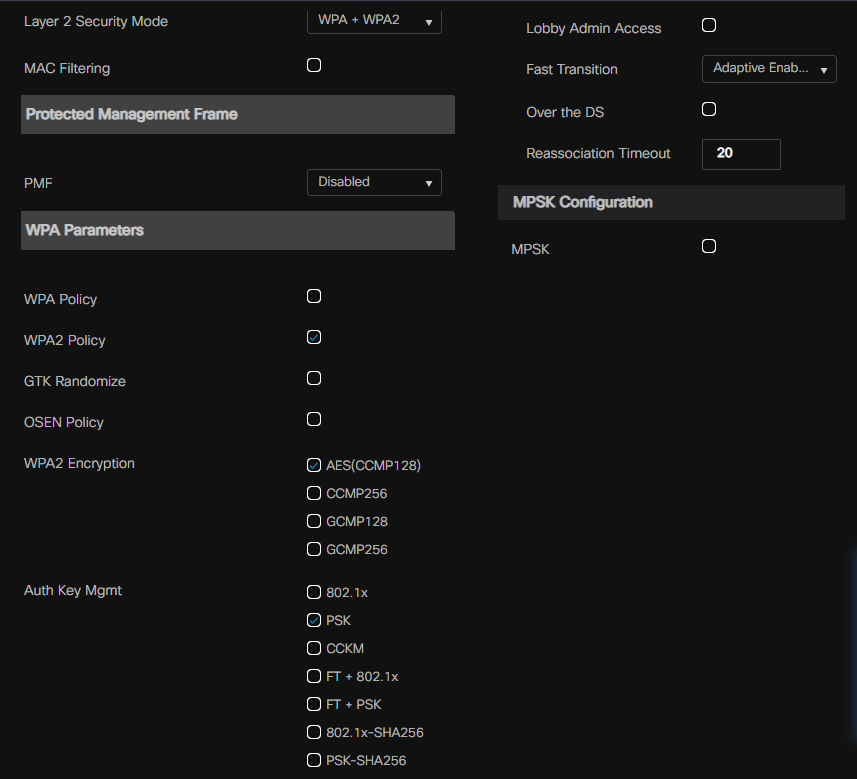

The answer lies within the RSN settings and support for 802.11r or Fast Transition. Fast Transition is a GREAT tool for keeping latency-sensitive applications from dying by applying special rules when roaming. The 80211 frame header contains a value for RSN which has a growing number of values that can be assigned. Each value is tied to a combination of authentication and security features. Here is an excellent post on WPA3 which includes RSN AKM values and their meanings by a well-known authority on the subject.
I am sure I was multitasking when I set this up, as the WLAN I had provisioned was setup for Adaptive FT instead of Fast Transition. 802.11r Adaptive is a proprietary protocol developed between Cisco and Apple to allow their IOS devices to roam better. Prior to this time, Apple devices had a hard time roaming (they were quite sticky) as they moved throughout a campus. A little more investigation and you can find this Blog Post talking through the issue as well.
So, I quickly provisioned a new WLAN and tested. I had a working solution in a matter of minutes. By changing the FT settings to "Enabled" I corrected the issue.

Working on PSK and FT

I should have had this identified earlier, this was an easy fix overlooked by human error. What strikes me most is the way this problem presented- it struck me as odd. Based on my understanding- for the Android devices as well as the Intel wireless cards the WLAN provisioned for "Adaptive" should not have worked. It appears that device drivers are getting more mature and some non-Apple devices are able to join these networks.
I plan on doing some more testing when I can obtain an additional AP to see if I can get these devices to perform a fast secure roam with Adaptive 802.11r, or if these devices will simply join the WLAN but without the capability enhancement of FT, thus simply ignoring the flags in the header.


This is a good example of why troubleshooting a WLAN can take more than checking the controller configuration. The fact that the same setup worked on a Samsung tablet and laptops but failed on another client is a useful reminder that device compatibility can be part of the problem. Checking the VPN tunnel, VLAN, and firewall configuration step by step makes it much easier to isolate where the connection is actually failing. 19216801ip.ws also provides practical networking guidance for users working through similar connectivity problems.